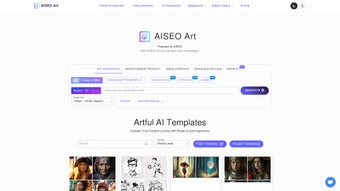

Download AISEO Art – Free AI Text‑to‑Image Generator, Create Stunning Art Online
Overview
AISEO Art is a web‑based AI art generator that turns simple text prompts into stunning visual creations in a matter of seconds. Powered by the latest diffusion models, the platform delivers high‑resolution, square‑format images—typically 1024 × 1024 px—perfect for Instagram posts, website banners, and portfolio pieces. What makes AISEO Art unique is the combination of an ultra‑intuitive interface with powerful customization tools.
Users can choose from a broad palette of artistic filters, ranging from hyperrealistic photography to whimsical fantasy, comic‑book style, watercolor, and abstract expressionism. The built‑in element‑eraser and replacement tool lets creators edit specific parts of an image without leaving the browser, while the autocomplete prompt assistant suggests popular keywords and phrasing to help users craft effective prompts faster. Because the entire workflow runs in the cloud, there is no need for bulky installations, high‑end graphics cards, or expensive subscription plans.
The service works on any modern browser that supports JavaScript, and the platform automatically encrypts all data transfers via HTTPS, ensuring a secure and private experience. Whether you are a professional designer needing rapid concept sketches, an illustrator searching for fresh inspiration, or a hobbyist curious about AI‑driven creativity, AISEO Art offers a free, secure, and instantly accessible solution that removes technical barriers and lets you focus on the artistic process.
Key Features and Advanced Controls
- Text‑to‑Image Generation: Convert natural‑language prompts into high‑quality artwork in seconds.
- Multiple Artistic Styles: Choose from hyperrealistic, fantasy, abstract, comic, watercolor, and more.
- Element Eraser & Replacement: Select and remove unwanted parts of an image, then replace them with new AI‑generated content.
- Autocomplete Prompt Assistant: Real‑time suggestions help craft effective prompts, reducing trial‑and‑error.
- Resolution & Format: Generates square images at 1024 × 1024 px, ideal for Instagram, profile pictures, and digital portfolios.
- Advanced Settings Panel: Adjust creativity level, style strength, and seed value for reproducible results.
- Instant Preview & History: View generated thumbnails instantly and revisit previous outputs from your session.
- Secure Cloud Processing: All image creation occurs on encrypted servers, ensuring privacy and data protection.
- Free Access with Optional Premium Upgrades: Core functionality is free; premium plans unlock higher resolutions and batch processing.
The feature set of AISEO Art is thoughtfully organized to accommodate both beginners and power users. For newcomers, the default interface presents a single text box, a style selector, and a “Generate” button, making the process as simple as typing a description and watching the AI work its magic. More experienced creators can dive into the “Advanced Settings” where sliders control parameters such as “Creativity (CFG Scale)” and “Style Weight,” providing granular influence over the final composition.
The element eraser is especially noteworthy; after an image is generated, you can click directly on any region, mask it, and instruct the AI to regenerate that portion while preserving the surrounding context. This iterative approach eliminates the need for external Photoshop work and dramatically speeds up the refinement cycle. The autocomplete prompt assistant also reduces the learning curve by suggesting popular keywords—like “cinematic lighting,” “golden hour,” or “low‑poly”—based on millions of prior successful prompts.
Together, these tools create a workflow where the creative spark is captured instantly, and the technical details are handled automatically, allowing users to focus on concept, composition, and style.
Installation, Usage Instructions, and Compatibility
Getting Started – No Download Required
Because AISEO Art is a cloud‑based service, there is no traditional installation process. Users simply navigate to the official website using a supported browser, such as Google Chrome, Microsoft Edge, Firefox, or Safari. The platform detects JavaScript support automatically; if it’s disabled, a banner will prompt you to enable it for full functionality. Once the page loads, you’ll see a clean workspace with a prompt field, a “Generate” button, and a sidebar for style selection. The responsive design adapts to tablets and smartphones, though the full suite of advanced settings is currently optimized for desktop browsers.
Step‑by‑Step Workflow
- Enter Your Prompt: Type a description of the image you envision. For example, “a futuristic cityscape at sunset with neon reflections.”
- Select a Style: Choose a filter from the sidebar—e.g., “Cyberpunk,” “Watercolor,” or “Abstract.”
- Adjust Advanced Settings (Optional): Use sliders to tweak creativity, style intensity, or seed value for reproducibility.
- Generate: Click the “Generate” button. The AI begins processing on secure servers; results appear within 10‑30 seconds.
- Refine with Eraser: If you need to change a specific element, click the eraser icon, paint over the area, and press “Regenerate Selection.”
- Download or Share: Once satisfied, click “Download” to save the PNG file, or use the built‑in sharing options for social media platforms.
System Requirements and Compatibility
AISEO Art runs entirely in the browser, so it is compatible with any operating system that supports a modern web browser, including Windows 10/11, macOS Monterey and later, Linux distributions, Chrome OS, Android (Chrome browser), and iOS (Safari or Chrome). The only hard requirement is an active internet connection and JavaScript enabled. For optimal performance, we recommend using the latest version of Google Chrome, as the platform’s WebGL and GPU‑acceleration features are best supported there. Mobile users will experience a responsive UI, though some advanced controls (seed value, detailed style sliders) are currently desktop‑only.
Security is a priority; all data transmission is encrypted via HTTPS, and generated images are stored temporarily (maximum 24 hours) before automatic deletion. No personal data is retained beyond what is necessary for session management, and users can clear their history at any time from the account dashboard. In summary, AISEO Art offers a frictionless, cross‑platform experience that requires nothing more than a browser and an internet connection, making it an ideal tool for designers, marketers, and hobbyists who need quick, high‑quality visual output without the overhead of traditional software installation.
Pros, Cons, and Frequently Asked Questions
Pros
- Free core functionality with high‑quality 1024 × 1024 output.
- No software download or installation; works instantly in the browser.
- Wide variety of artistic styles and advanced customization options.
- Element eraser & replacement reduces reliance on external editing tools.
- Autocomplete prompt assistant speeds up the creative process.
- Secure, encrypted cloud processing ensures privacy.
- Responsive design works on desktop and mobile browsers.
- Instant preview and session history streamline workflow.
- Optional premium tier provides higher resolutions and batch processing.
Cons
- Image resolution limited to 1024 × 1024 in the free tier; higher resolutions require a paid plan.
- Processing speed depends on server load and internet connection quality.
- Advanced settings can be overwhelming for absolute beginners.
- Only square format is currently supported; no landscape or portrait options.
- Requires JavaScript; users with disabled scripts cannot access the tool.
- Premium features are behind a subscription, which may deter occasional users.
Frequently Asked Questions
Is AISEO Art completely free to use?
Yes, the core features—including unlimited text‑to‑image generation at 1024 × 1024 pixels—are free. Premium plans are optional and provide higher resolutions, batch processing, and priority server access.
Do I need to create an account?
An account is not required for basic use, but registering lets you save history, access premium features, and manage your subscription.
Can I use the generated images for commercial purposes?
Yes, images created with the free tier can be used commercially, provided you comply with the platform’s terms of service and do not infringe on any third‑party rights.
What browsers are supported?
AISEO Art works best on the latest versions of Chrome, Edge, Firefox, and Safari. Mobile browsers on Android and iOS are also supported, though some advanced features may be desktop‑only.
How does the element eraser work?
After an image is generated, click the eraser icon, paint over the area you want to modify, and press “Regenerate Selection.” The AI re‑creates that portion while preserving the surrounding context, allowing precise edits without leaving the platform.
Is my data safe on AISEO Art?
All communications are encrypted via HTTPS, and generated images are stored temporarily (max 24 hours) before automatic deletion. No personal information is retained beyond what is needed for session management.
Conclusion – Is AISEO Art Right for You?
AISEO Art stands out in the crowded AI‑art marketplace by delivering a balance of simplicity and depth. Its free, browser‑based model removes barriers to entry, while the suite of artistic filters, prompt autocomplete, and element‑level editing give power users the control they crave. The square‑only output and 1024 × 1024 limit in the free tier may feel restrictive for some, but the optional premium upgrade solves those issues without locking out casual creators.
If you’re an illustrator looking for rapid concept sketches, a marketer needing eye‑catching visuals, or a hobbyist eager to explore AI‑driven imagination, AISEO Art provides a secure, fast, and enjoyable experience. The platform’s emphasis on privacy, zero‑install access, and cross‑device compatibility makes it an attractive choice for anyone who wants to turn text into high‑quality artwork without learning complex software. Click the button below to launch the generator, experiment with your first prompt, and see how quickly text can become masterpiece‑quality art.



.png)



